
In the upcoming updates for the XBOX version, I would like to focus on three main areas.
Section 1 – Improving Virtual Keyboard Input Reliability
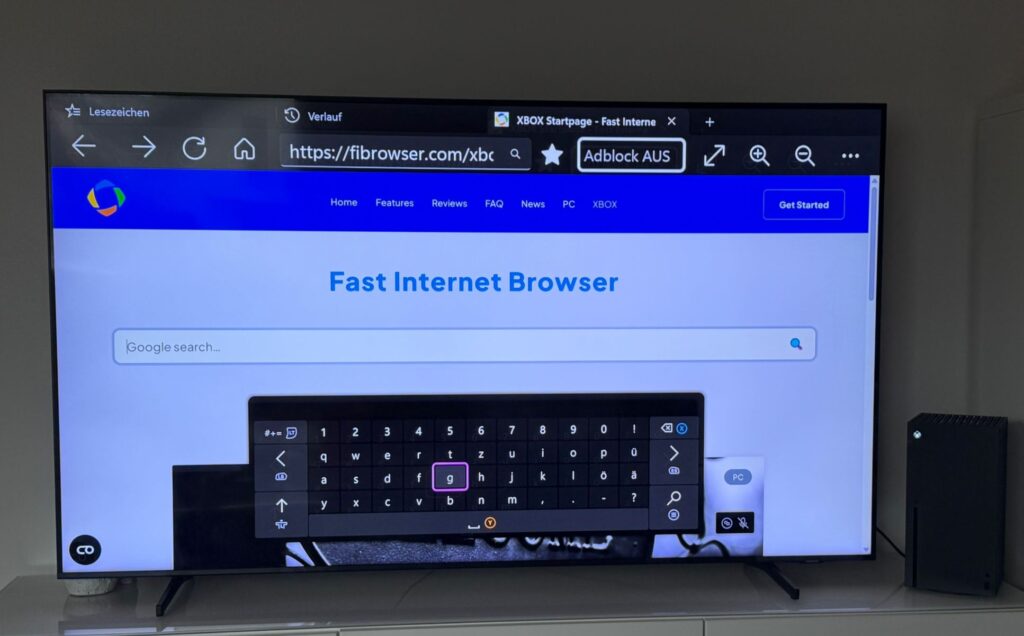
Some users have reported an issue in the Xbox version of the browser where text input fields do not always behave as expected. In certain situations, after selecting an input field such as a search box or login form, typing on the Xbox virtual keyboard does not insert characters into the field.
Although the field appears to be selected, the entered characters are sometimes not registered. Based on current analysis, this behavior may be related to how focus is handled within the UWP layout system in combination with WebView2. In particular, there seems to be an inconsistency between the visual focus state and the actual input focus inside the WebView layer when the Xbox system keyboard is triggered.
For the upcoming update, I will be working on improving how input focus is detected and maintained when the virtual keyboard is opened. The goal is to reduce cases where the WebView does not correctly receive keyboard events after an input field has been selected.
What this update aims to improve:
- More reliable text input behavior
- Better synchronization between UWP layout focus and WebView2 input handling
- Fewer cases where typing does not register
- Smoother interaction with forms and search fields
As with all platform-specific input handling, this requires careful testing across different websites and layouts. The focus of this update is to improve stability and consistency in real-world usage scenarios.
Section 2 – Microphone Support
One of the most frequently requested features from users has been microphone support within the Xbox version of the browser — especially for platforms like Discord and other web-based communication tools.
Several users have asked whether voice input or microphone access could be enabled to allow smoother interaction with web applications that rely on audio input. This is particularly relevant for browser-based Discord usage, where voice functionality is central and typing with a controller can be slow.
From a technical perspective, enabling microphone access in a UWP-based application using WebView2 is not entirely straightforward. One of the key aspects currently being evaluated is whether WebView2 can handle microphone access natively through standard web APIs, or whether the application itself needs to directly interface with the underlying hardware capabilities exposed by the Xbox system.
This involves determining:
- Whether WebView2 properly forwards media permission requests
- If UWP capability declarations are sufficient for microphone access
- Whether additional hardware-level handling is required within the app
- How stable microphone access remains during real-world usage
At this stage, I am analyzing whether microphone integration can be handled entirely through WebView2’s web standards support, or if direct hardware interaction via UWP APIs becomes necessary.
Section 3 – Verifying Mouse and Keyboard Support
Another important aspect of the upcoming update is mouse and keyboard support on Xbox.
While many users have already reported that mouse and keyboard input works in practice, I want to properly verify that this functionality behaves consistently and reliably across different usage scenarios.
On Xbox, peripheral input can behave differently depending on how focus handling, UWP input routing, and WebView2 event forwarding interact. In some cases, features may appear to work under basic conditions but reveal edge cases when interacting with more complex websites or input-heavy applications.
As part of this update cycle, I will be reviewing:
- How mouse pointer events are forwarded to WebView2
- Whether keyboard input behaves consistently across different websites
- Focus transitions between UI elements and web content
- Potential edge cases involving text fields, scrolling, and navigation
Even if basic support is already functional, the goal is to ensure predictable behavior under real-world conditions — not just isolated tests.
Reliable peripheral support is especially important for users who prefer a desktop-like browsing experience on Xbox. Final confirmation of seamless operation will depend on thorough testing across different environments and websites.
I appreciate any feedback or suggestions and encourage users to contact me at our support mail
Best
Michael