
When I started using a browser on a console more regularly, I expected a few limitations. Slower performance, maybe some layout issues — nothing surprising.
But what stood out quickly was something else.
Some websites worked perfectly fine. Others didn’t just behave differently. They were almost unusable. Buttons didn’t respond, videos wouldn’t play, login flows broke halfway through, or the site simply refused to load at all.
After spending more time testing this, two specific patterns kept showing up.
The first one was websites that rely on DRM-protected video playback. These sites would often fail to play content entirely or behave inconsistently, even though the same content works without issues on a PC.
The second pattern was bot protection systems. On some sites, I ran into unexpected blocks, verification loops, or pages that simply wouldn’t load properly — as if the browser was being flagged as something it isn’t.
What makes this behavior especially confusing is that it’s not what you would normally expect. Both the PC version and the console version are based on the same WebView2, which itself is built on top of Chromium. From a purely technical perspective, they should behave very similarly.
But after testing this across multiple sites and setups, it became clear that this isn’t the full story.
In many cases, websites don’t just fail on consoles. They are not really designed to work there in the first place. And sometimes, they are actively restricted.
This article breaks down why that happens
DRM
One of the clearest examples of this behavior shows up when trying to access streaming platforms that rely on DRM-protected video.
To make this more concrete, here’s what happens when opening Netflix in a browser on Xbox.

In this case, the error code shown is D7701-1003. From a user perspective, this looks like a typical playback issue. But it’s not really about buffering, performance, or a temporary glitch.
What’s actually happening here is that the platform checks whether the environment meets its DRM requirements before allowing any protected content to load.
Streaming services like Netflix rely on technologies such as Widevine to securely deliver video content. Even though WebView2 is based on Chromium, DRM support is not just about the browser engine itself.
It depends on additional factors like:
- platform-level DRM integration
- hardware security modules
- licensing and certification
- how the browser is embedded and configured
On a PC, all of this is typically available and properly configured. On a console browser, even with the same Chromium base, this chain is often incomplete or intentionally restricted.
I suspect that this is a deliberate design choice; DRM isn’t supported via WebView2 on the Xbox, even though it uses the same Windows core.
Bot Protection
The second pattern I kept running into is less obvious, but just as impactful: bot protection systems.
On certain websites, the browser doesn’t just fail to load content — it gets flagged. Pages may show endless verification loops, fail silently, or return generic error screens without a clear explanation.
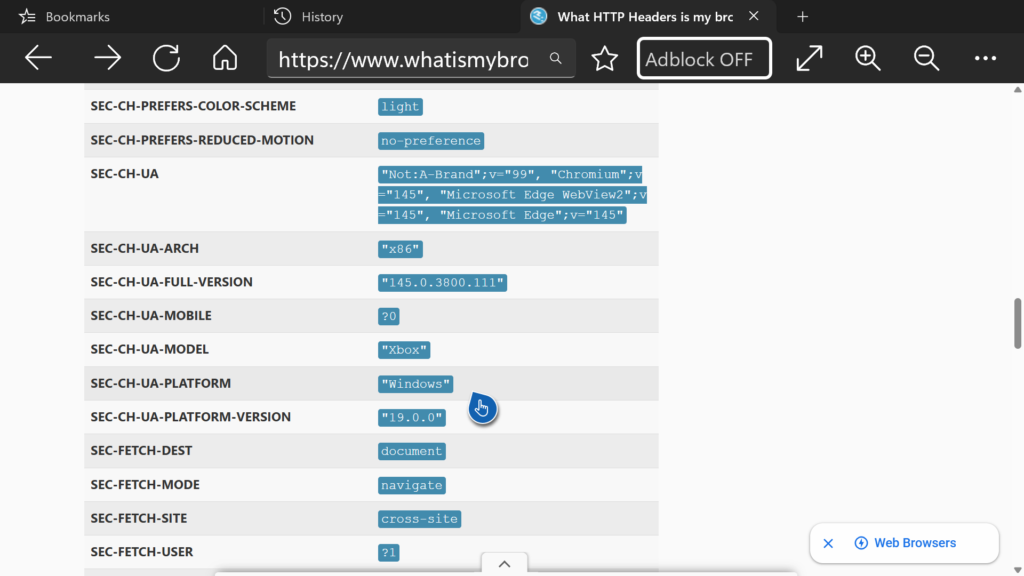
What makes this interesting is that this doesn’t happen consistently across all sites. Many websites work perfectly fine, while others react as if the request is coming from an automated system.
Looking at the actual request data gives a clue why.
In this setup, the browser sends a combination of headers that is technically valid, but slightly unusual compared to a typical desktop browser. For example, client hints such as SEC-CH-UA-MODEL: "Xbox" or other environment-specific values clearly indicate that this is not a standard desktop device.
Based on this, my assumption is that some bot protection systems react to these signals. Not all of them — but some appear to treat these requests as suspicious or at least non-standard.
This can include factors like:
- device-specific identifiers (e.g. console-related values)
- differences in client hints headers
- subtle deviations from common desktop browser patterns
Even though the browser is built on WebView2 and therefore on Chromium, these additional signals are enough to make the request stand out.
Modern bot protection systems don’t just look for obvious automation anymore. They evaluate patterns. And if something doesn’t fully match what they expect from a “normal” browser environment, it may get flagged — even if it’s a real user on a console.
This behavior is not universal. It depends entirely on how strict a given system is configured.
Some websites allow it without any issues. Others block or restrict access automatically.
Why Websites Make These Decisions
After seeing these patterns DRM restrictions on one side and bot protection on the other — the obvious question is: why this happens at all.
From my perspective as someone building a browser for Xbox users, this is where things get a bit frustrating.
Because the reality is: I would absolutely want these things to work.
I’ve spent weeks trying to understand and improve these exact issues for my users — testing different setups, comparing behavior across devices, and trying to narrow down where things break. And while some parts became clearer over time, others turned out to be outside of what I can realistically influence.
DRM is the clearest example.
Streaming platforms rely on strict requirements that go far beyond the browser itself. Even though the browser is based on WebView2 and therefore on Chromium, the full chain of requirements — secure hardware, licensing, platform-level integration — is not something I can control from within the app.
So even if everything looks like it should work, playback can still be blocked. And at that point, there’s simply nothing I can do on the browser level.
Bot protection is different, but still problematic.
Here, it’s not a hard technical limitation. It’s more that some systems don’t really know how to classify this kind of environment. The browser behaves like a normal Chromium-based client, but certain signals — like device-specific hints or subtle differences in how requests are structured can make it look unusual.
And that’s enough for some systems to react.
Not all of them, but some will flag the request, trigger verification loops, or block access entirely. From the outside, this feels random. But in reality, it’s just how strict these systems are configured.
This is also one of the few areas where I can at least try to improve things over time. Not by bypassing anything, but by better understanding how these systems interpret requests — and reducing cases where real users get caught in that filter.
Still, there are limits here as well.
A lot of modern web infrastructure is simply not built with consoles in mind. It’s optimized for desktop and mobile, and anything outside of that can end up in edge cases — whether that’s DRM failing or bot protection being overly aggressive.
And in some situations, it’s not even just technical.
There are also business decisions behind it. Some platforms clearly prefer users to go through their official apps, where they have more control over performance, tracking, and monetization.
Best
Michael